cat apps/keyclu

What it does
KeyClu watches which app is in focus and shows its shortcuts on demand.
Just press ⌘ twice and hold to see the list.
Features
Everything KeyClu can surface, and how you shape it.
Overview
Simply press ⌘ twice and hold to see the list.
Learn
Hide unwanted or already-known shortcuts.
Bookmark
Mark shortcuts so they catch your eye.
Adjustable View
Adjust the layout, font size, length and more to your liking.
Persistent Panel
Have shortcuts always present on screen.
Customize Shortcuts
Pair with CustomShortcuts for full control.
Own Shortcuts
Register shortcuts manually.
Ready-made Sets
Shortcut sets for apps that miss one. Browse and import from KeyClu Extensions or export and share yours.
macOS Shortcuts
Display macOS keyboard shortcuts.
SKHD Hotkeys
Pair with skhd to display hotkeys.
macOS Gestures
Display macOS trackpad gestures.
Jitouch2 Gestures
Pair with Jitouch2 to display gestures.
Support 3rd-party
Make it work the way you choose with CLI params.
Pause
Pause the app when you don't need it.
Filter & Highlight
Search and highlight the shortcut you're after.
Export to Markdown
Save the shortcuts of the app you're in as a Markdown file, ready to paste into notes or a wiki.
Apple Menu Too
Show the Apple menu's own items alongside the app's, from Settings › Appearance › Visibility.
Wiki
Advanced configuration, custom shortcut syntax, and troubleshooting. Read Wiki.
Missing Something?
Ask for it - feature requests and bug reports go to GitHub Issues.
Private by Design
No accounts, no tracking, no ads, nothing sent anywhere. Your settings and shortcuts never leave your Mac.
Languages
English, German, Chinese and Japanese out of the box. Missing yours? Request it on Crowdin.
Limitations
And known issues.
- May not display every shortcut an application responds to, if it isn't listed in the app's menu
- May display extra shortcuts the app itself doesn't show, if they're hidden inside its menu
- May have difficulty handling or displaying menus represented by icons or images
- May have difficulty handling or displaying hidden app menu items
Install
Manual install or with Brew.
Open Terminal and run the command below. Requires Homebrew.
Download the latest KeyClu .dmg from GitHub Releases, then follow the three steps below.
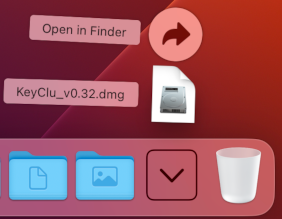
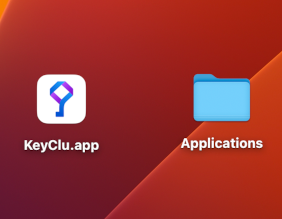
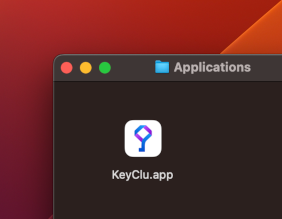
Requirements
macOS 11 Big Sur or later. Apple Silicon and Intel supported.
Permissions
Accessibility permission is required. The Notification Center is optional and only affects notifications.
Accessibility - required
KeyClu reads the menu items of the app you're using, which macOS only allows with Accessibility permission. Import and export need it too.
Grant it in System Settings › Privacy & Security › Accessibility.
Notification Center - optional
macOS may ask for Notification Center access so KeyClu can quietly report updates, imports, and exports.
Decline it and everything else keeps working.
Version History
Latest changes. Full changelog.
- fixed database access prompt on launch on macOS 15+ (will still appear one last time)
- improved performance
- improved UI to be on pair for macOS versions
- added Japanese localization #157